Platform, Security, Workplace
How to master Azure Load Balancing the right way

Platform, Security, Workplace
Here’s a fun game. Deploy a few Azure resources, forget about them for a month, then open your bill. It’s basically drunk online shopping. Everything seemed like a great idea at the time and now there are things arriving you have absolutely no memory of ordering. What’s this? Don’t know. Why is it running? No idea. How long has it been doing that? Great question.
The thing is Azure’s pricing isn’t random, it just doesn’t work like anything most people are used to. There’s no one-time price tag. You pay for what you use, when you use it, where you use it, and sometimes apparently just for having the audacity to move data from one place to another. That flexibility is genuinely useful until you’re not paying attention and then it’s just. A number. A large one. In your inbox.
This guide is basically the thing I wish existed when I was staring at that number going okay but why. Not a full explainer on every Azure service that’s ever existed, just the practical stuff. How to get ahead of the bill instead of just reacting to it every month and having the same conversation with the same person from finance who is starting to recognise your name in a way that feels personal.
This guide to Azure cost management is about building a practical mindset.
So there are a couple ways this works and most people including me operated on maybe two of them for way too long. Which, looking back at some old bills, explains quite a lot.
The default is pay as you go which is exactly what it sounds like. You use stuff, they charge you for it, the rate is whatever it is. Fine when you’re new. Gets quietly expensive when you’ve been on it for ages and just never looked at whether there was a better option, which is a thing that happens to completely normal competent people and definitely not just me.
Reserved instances and Azure Savings Plans are both discount deals in exchange for committing to something upfront and the difference between them took me an embarrassing amount of time to actually understand. Reservations are for specific resources, you say I’m going to use this particular VM size for a year, savings plans are more like I’m going to spend at least this much per hour on compute generally and it can flex across different things. The savings plan is better if your needs shift around a lot. Allegedly.
I think it’s the other way around. For example, when you have a managed services platform in Azure and you have a Hub and Spoke environment where each Spoke is a customer or project I would activate a reservation on each subscription for 3 years and after 1-2 months I would check if I can add a saving plan on top of that for maximum savings. Let’s say you want to cancel a reservation before the 3 year period, at this time Microsoft doesn’t charge you the 12% cancellation fee, this might change of course. So, this way you get the maximum percentage on a RI and you can top that up with a SP later on. Keep in mind, you can’t cancel a SP.
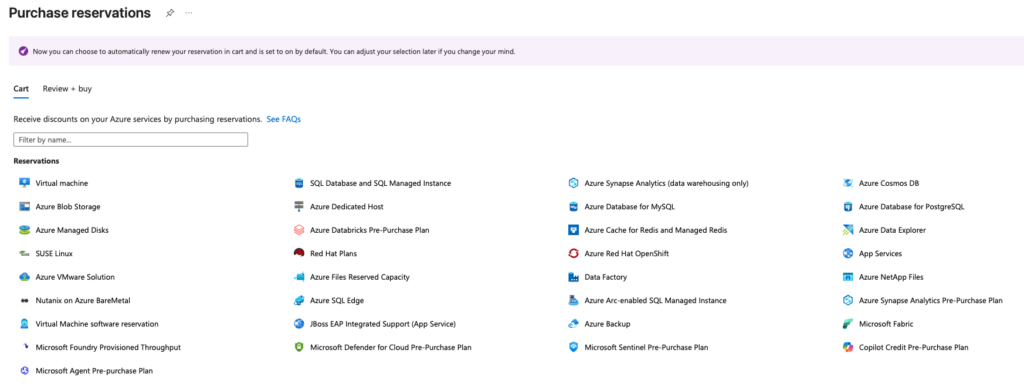
To create a reservation, first go to reservations and then click on “Add”

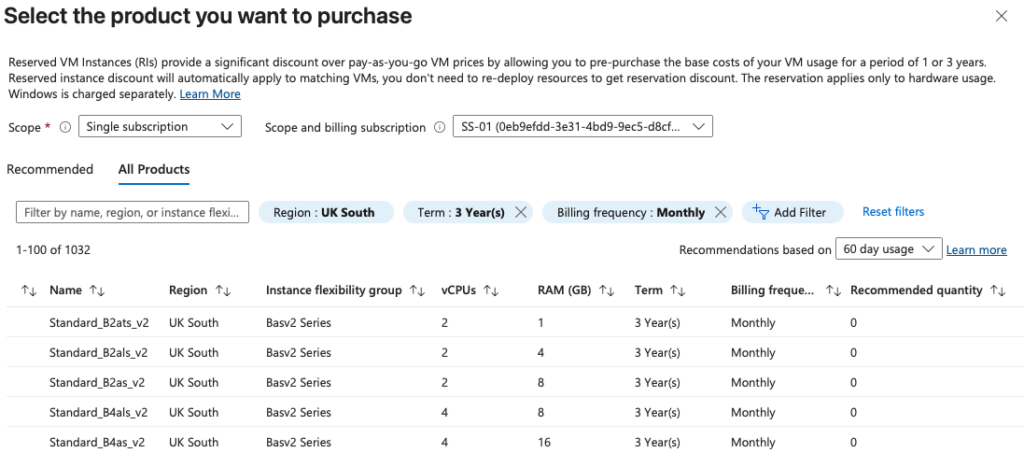
Then you can choose for which product you want to make a reservation for.
And then you can choose what the scope of the reservation is, for example to a single subscription but you can also target the whole tenant, management group or single resource group and then select which subscription you want to target it for. And the last step would be select the product.
Spot pricing is the one that feels like a trick but isn’t. Spare capacity Azure has sitting around, they’ll let you use it cheap, like actually cheap, 90% off sometimes. They can take it back with basically no notice though so if your thing needs to keep running it’s not for you. If you’ve got batch jobs or test environments or anything that can get interrupted and restart without the world ending, genuinely worth looking at. Most people just don’t know it exists.
| Pay-As-You-Go | Reserved Instances | Azure Savings Plan | Spot | |
|---|---|---|---|---|
| Best for | Spiky or experimental workloads | Stable, 24/7 workloads | Dynamic workloads across regions | Interruptible workloads |
| Commitment | None | Specific resource & region | Hourly spend amount | None |
| Flexibility | Highest | Low | High | Highest |
| Discount | 0% | Up to 72% | Up to 65% | Up to 90% |
There’s a pricing calculator on the Azure website and I’m going to assume you’ve either never used it or opened it once, found it slightly confusing, and closed it. That was me for a long time. It’s actually fine once you spend ten minutes with it and the whole point is you get a rough number before you’ve committed to anything rather than finding out what something costs by just. Running it and seeing.
The thing is it shows you the obvious stuff. Compute, storage, the line items with clear labels. It does not automatically show you data transfer costs which is the one that gets people most often because it doesn’t feel like it should be a thing. Moving data between regions costs money. Moving data out to the internet costs money. Two services that you thought were basically next to each other that are actually in different regions, that’s costing you something every time they talk and it adds up in a way that feels genuinely personal the first time you notice it. And then licensing if you’re running anything Microsoft flavoured, Windows VMs, SQL Server, sitting there on the bill looking innocent. And then orphaned resources but we’ll get to that.
Just use the calculator and then add some percentage on top of whatever it says. 20% maybe. Could be more. Depends how many surprises you want and what kind of relationship you have with your finance team.
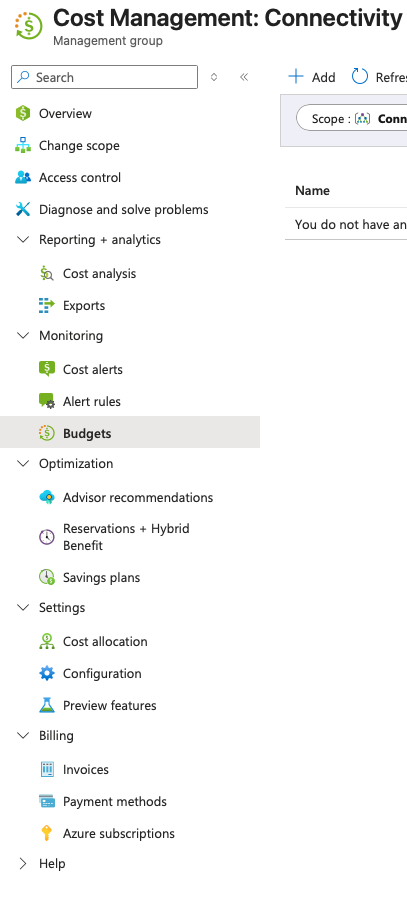
Nobody sets them. I’ve asked around and the usual answer is something like “yeah we should do that” which is not the same as doing it. You go into Cost Management, you set a number, you tell it to email you when you’re getting close to it. That’s genuinely it. I don’t know why this isn’t the first thing everyone does when they set up an Azure account, it should probably be mandatory honestly.
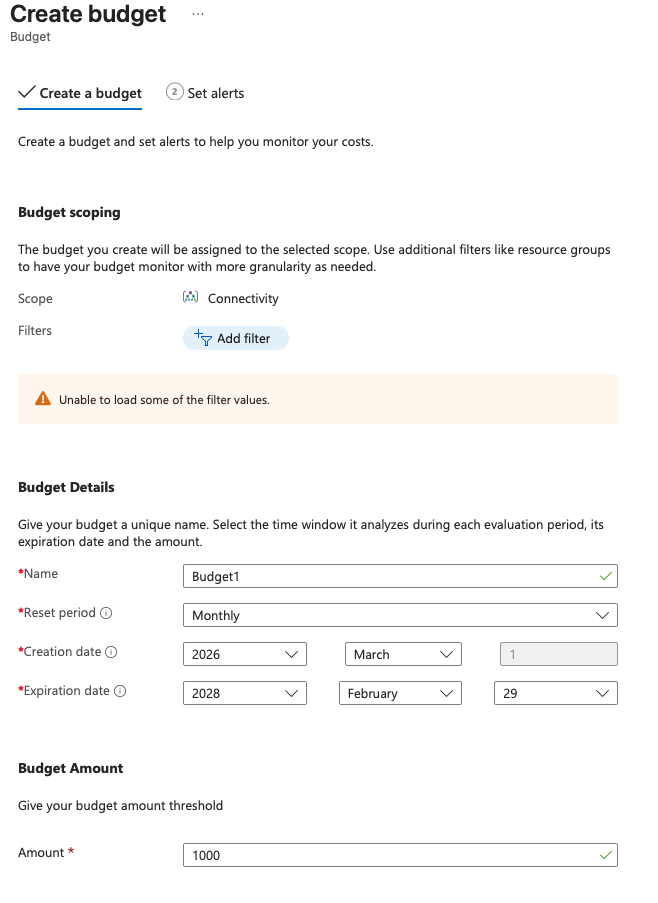
80% is the right threshold not 100 because by 100 you’ve already spent it and the email is basically just a fun fact at that point. Congratulations, here’s what happened.
I know how this sounds. Tags are the thing everyone agrees is important and then doesn’t do. I was the same way until I couldn’t figure out why one of our subscriptions was costing what it was costing and spent about two hours clicking around getting nowhere and then had to go ask someone who had been on holiday and was very clearly annoyed to be contacted about this.
Anyway. Tags are labels you put on resources so you know what they’re for and who owns them. The technology is not the hard bit. The hard bit is convincing the person who spun up six virtual machines at 11pm to go back and tag them properly, which is a social problem not a technical one and I don’t have a great answer for it beyond just being quite persistent about it. If the persistence isn’t working look up Azure Policy, you can use it to just force the tagging, we didn’t bother until we had a situation and then we bothered.
Not to something big that you made a decision about. It’s always the small stuff. A VM from November that was supposed to be a quick test. A disk that got left behind when someone deleted the VM it was attached to without realising the disk doesn’t automatically go with it, that one is so common it should be in the onboarding docs for every cloud team, we’ve done it twice and I’ve heard of people doing it way more than that. Check your storage tiers while you’re in there too, old logs and backups and stuff nobody’s touched in months don’t need to be on hot storage, there are cheaper tiers and the default is hot so chances are you’re paying for it without thinking about it.
Azure Advisor flags all of this. Sits right there in the portal telling you exactly what you’re paying for that you’re probably not using and honestly the amount of people who just. Don’t look at it. Is a lot/
The scaling up part most people have thought about. Traffic spikes, more instances come online, great, that’s working as intended.
What I didn’t really think about for ages was what happens after. Because a lot of setups are pretty enthusiastic about scaling up and then kind of. Vague. About scaling back down. The thresholds are too conservative or the cooldown period is too long or honestly sometimes the scale-in rules just never got finished properly because everyone was focused on making sure the thing could handle load and nobody was thinking about the other direction.
So you get these situations where you had a busy morning and it’s now 4pm and you’ve still got three times the capacity you need running because the autoscaler looked at it, decided it wasn’t quite sure yet, and left it. Go look at your scale-in settings specifically, not just that autoscaling is on but what the rules actually are for coming back down. And put a cap on the maximum instances, I know someone who didn’t and had a very bad week because of it.
Dev and test environments not running overnight is a related thing, you can automate shutdowns with Azure Automation runbooks, it’s basically just a scheduled script, takes an afternoon to set up and then just runs forever quietly saving you money while you do other things.
Okay so this one you can ignore if you’re still pretty early stage and your infrastructure changes a lot. But if you’ve got things that have been running constantly for six months and show no signs of stopping, pay as you go is just costing you more than it needs to.
Reservations are a one or three year commitment and in return the price drops quite a bit. The commitment part is the thing that puts people off and fair enough, you don’t want to reserve something that gets deprecated or shut down or whatever. But for the boring stable stuff the maths usually makes it pretty obvious. Pull your usage data, see what’s been running without interruption, go from there. Also if you’ve got existing Windows Server or SQL Server licences through a Microsoft agreement look up Azure Hybrid Benefit because there’s a decent chance you’re paying for licensing you don’t need to be and most people who are eligible just. Aren’t using it.
When you’re setting things up you pick a size and you move on because there’s always something else to do. And then six months later that thing is using 6% of its allocated CPU and you’re paying for the rest of it to just. Exist.
Advisor flags this too. Honestly Advisor is quite useful and I think it has a bit of an image problem because it also sometimes suggests things that aren’t relevant to your situation and people start ignoring the whole thing. Don’t do that. Just ignore the bad recommendations and fix the good ones.
Everything above is kind of pointless if you do it once and walk away. Things drift. People deploy stuff. Something scales up for a reason that no longer exists and just stays there.
Monthly, quick check, Cost Management, anything weird compared to last month, anything new in Advisor. Twenty minutes. Quarterly, proper sit-down, are the reservations still right, has the tagging quietly fallen apart again which it always has a bit, is there anything you’ve just been accepting because fixing it felt like a whole thing.
Most teams skip the quarterly one until something forces them to. Then they find stuff and feel a bit weird about it. You can just do it before that happens.
None of this is secret information. It’s just that nobody really sits down and goes through it in a way that’s actually usable, most of the official documentation reads like it was written for someone who already knows everything and just needs a reminder, which describes approximately nobody who has ever Googled “why is my Azure bill so high.”
Budgets, tags, Advisor, reservations. That’s most of what matters. The bill stops being a surprise, you stop having that conversation with finance. Future you, opening a bill that actually makes sense, will be very smug about it.
Found this useful? Read more architecture and platform articles on larsschouwenaars.com/governance. For questions or feedback, reach out via the about page.
